
1. What it is
The connector links Claude to Atlas, Atharix’s agentic ARM (Agentic Relationship Management). From a conversation you can look up leads, conversations, accounts and receivables, log calls and tasks, load contacts from a spreadsheet, and review or adjust your WhatsApp agents.
It works in Claude on the web, desktop and mobile, in Claude Code, and on Claude Team and Enterprise. Custom connectors work on Claude Free, Pro, Max, Team and Enterprise. Free allows one custom connector. You sign in with your usual Atlas account and choose what Claude may do. There is no key to copy.
The connector is in production and exposes 67 tools. Transport is Streamable HTTP and it accepts POST only. It publishes no MCP resources or prompts. Atlas is not in Claude’s connector directory: you add it by hand. The Spanish article is Atlas + Claude via MCP.
Connector URL: https://atlas.atharix.com/mcp
2. Before you start
- An Atlas account where you are the business owner or an admin. Other roles cannot connect apps.
- A Claude account (Free, Pro, Max, Team or Enterprise). On Team or Enterprise, an Owner or Primary Owner adds the connector first.
- The Claude connector requires the Atlas Business or Group plan.
- If you will connect your customers’ data, list Anthropic as a processor in your data-protection records.
3. How to connect
- In Claude, open Customize › Connectors and click "+ Add" › "Add custom connector".
- Paste https://atlas.atharix.com/mcp.
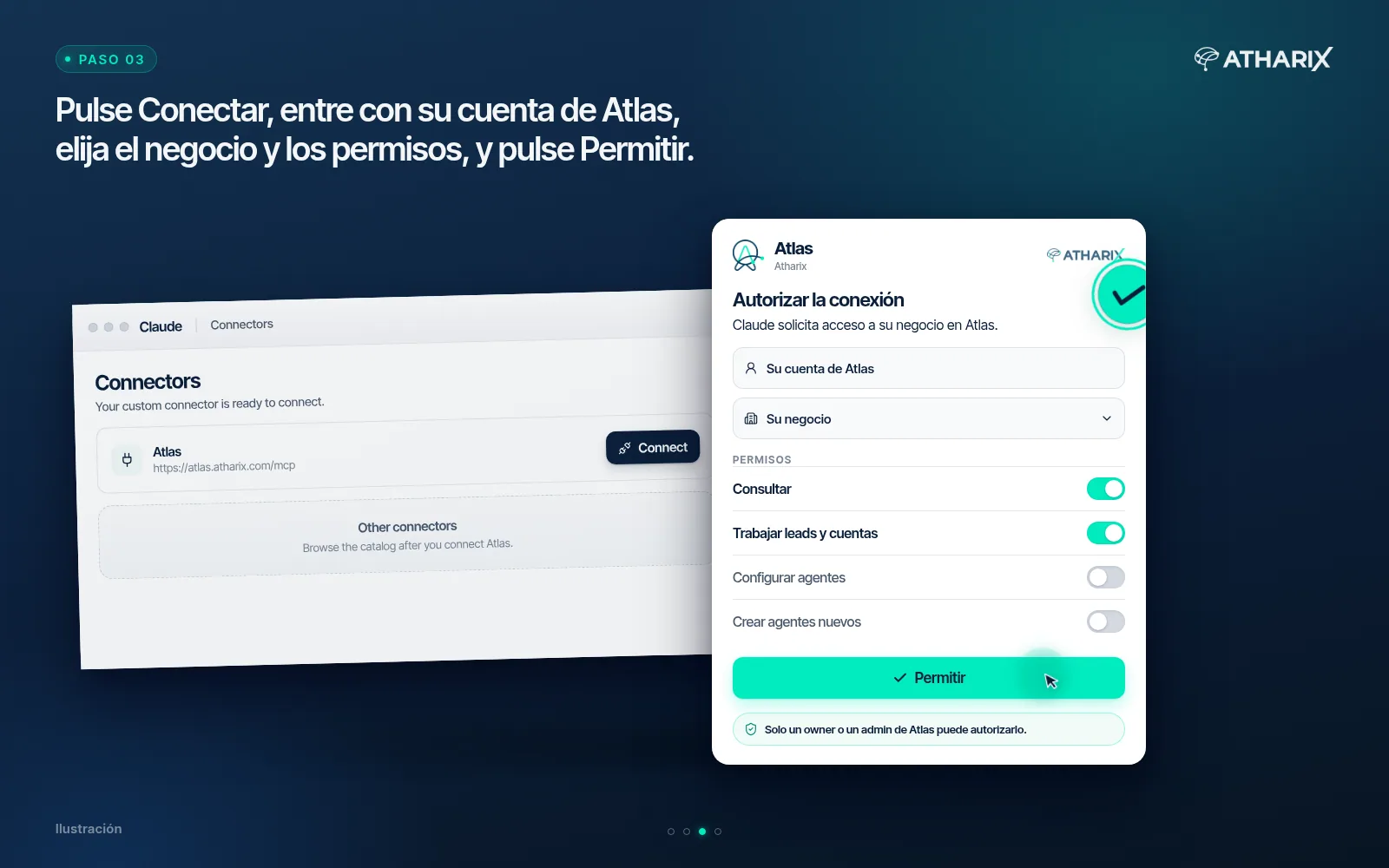
- Click Connect. The Atlas screen opens. If you are not signed in, sign in as usual.
- Choose the business and the permission bundles (section 4). Click Allow. You return to Claude, connected. Cancel connects nothing.
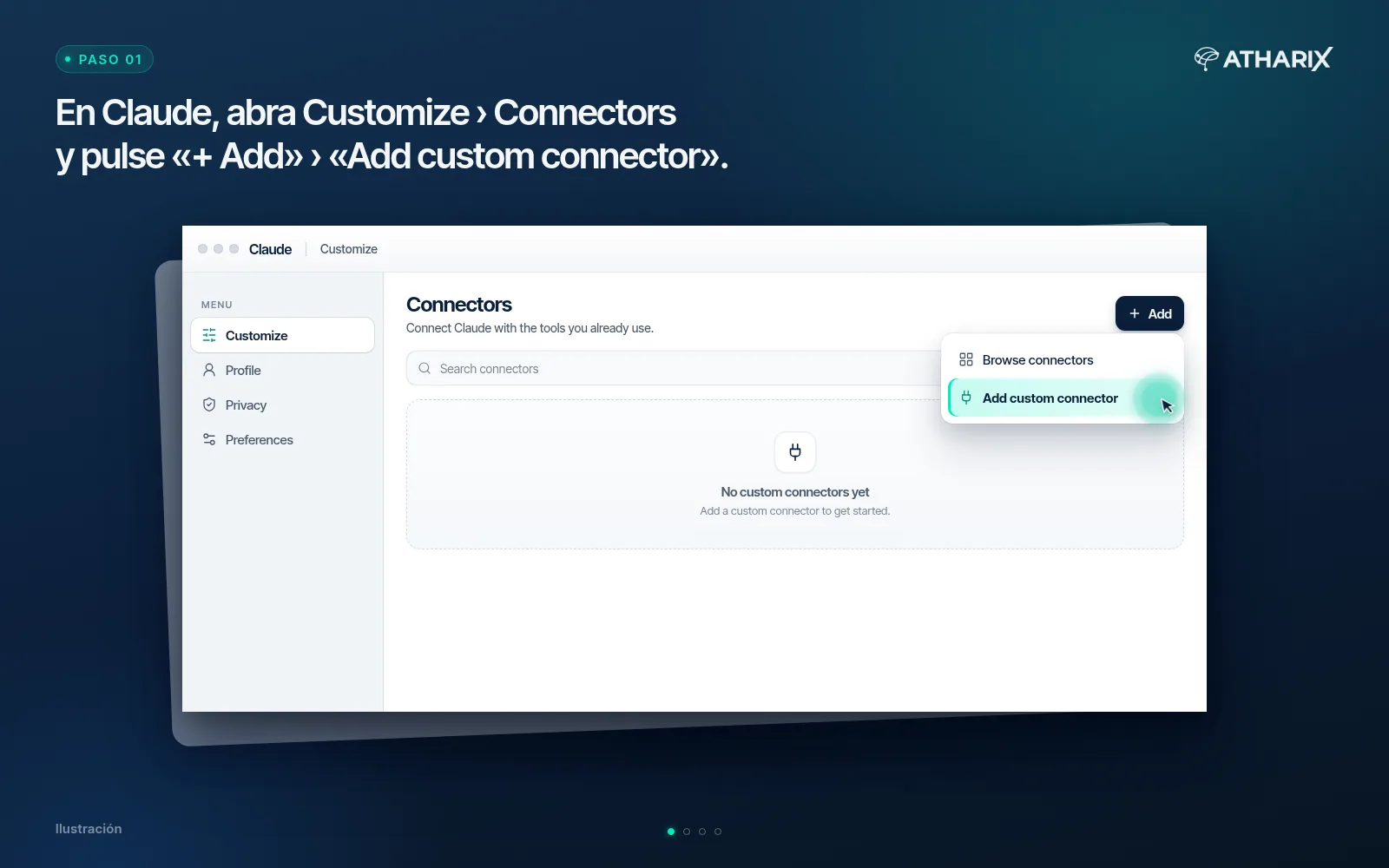
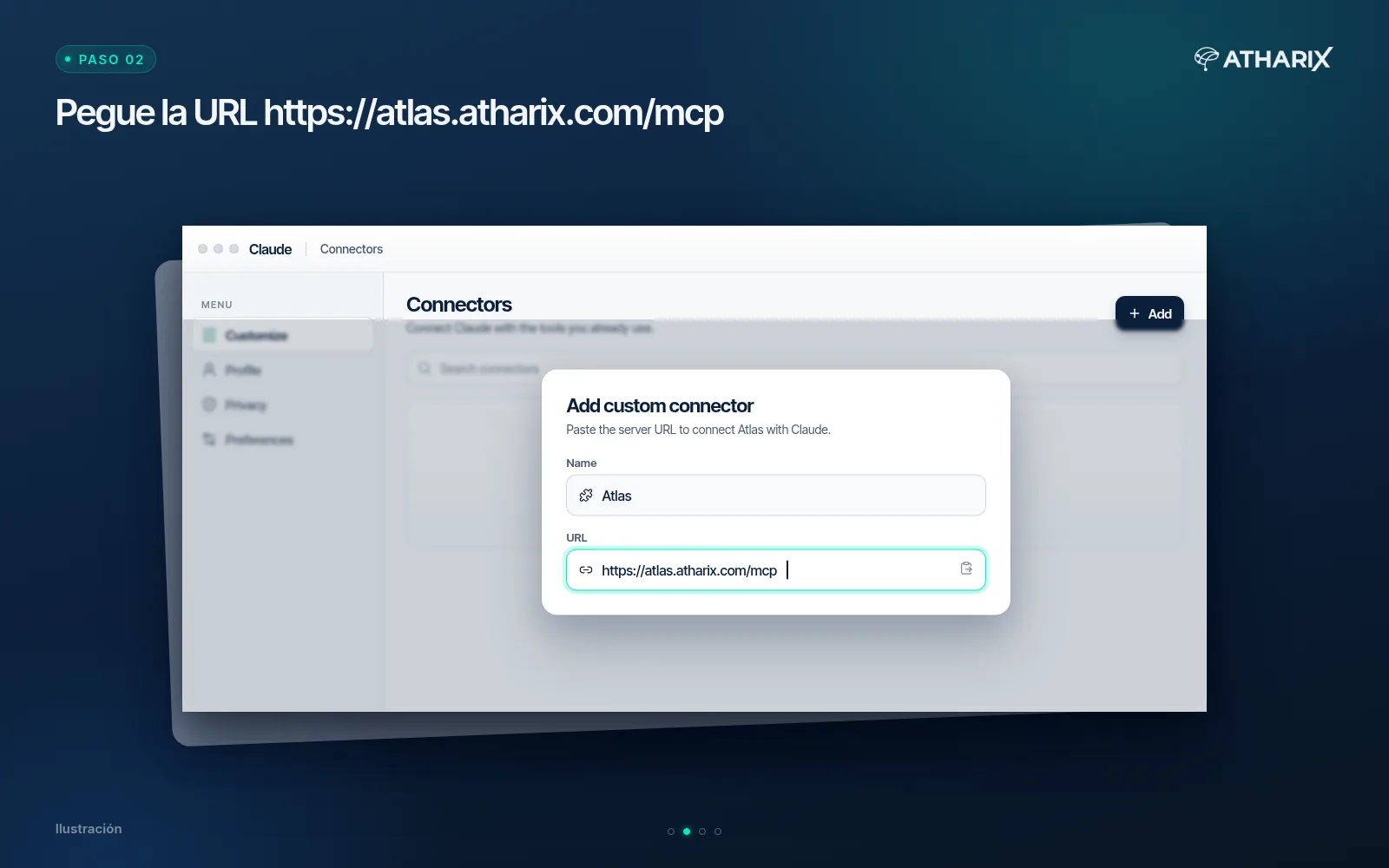
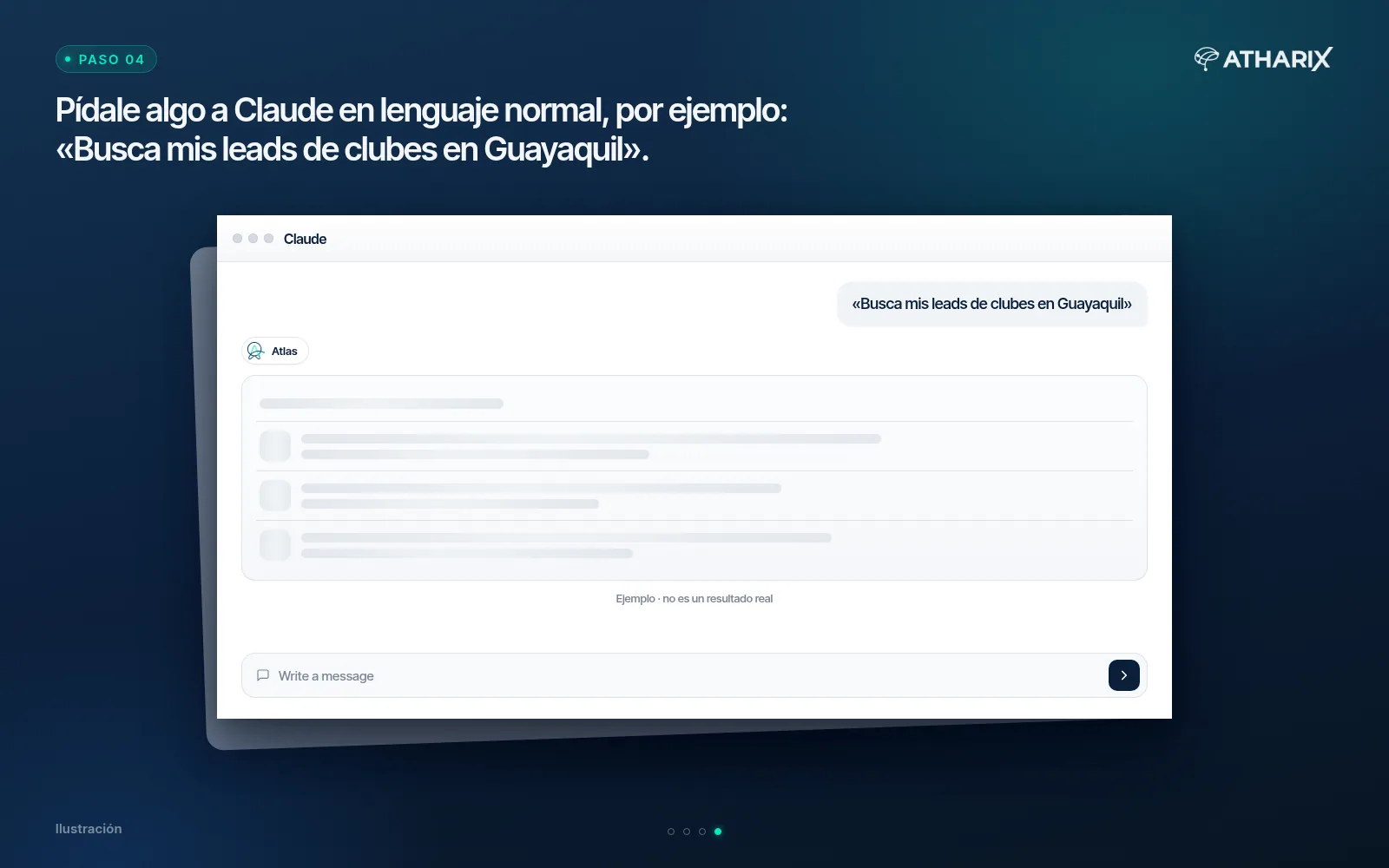
Claude Free allows one custom connector. Pro, Max, Team and Enterprise support custom connectors as well.
On Claude Team or Enterprise, an Owner or Primary Owner adds it first in Organization settings › Connectors › Add › Custom › Web (name and URL). Each member then opens Customize › Connectors, finds the connector marked Custom and clicks Connect, with their own Atlas account.
There is no official Claude Desktop JSON for this server. The documented path is the Connectors screen.
In Claude Code: claude mcp add --transport http atlas https://atlas.atharix.com/mcp and then /mcp to sign in (OAuth 2.0 with PKCE). The same command accepts an X-API-Key header from an Atlas service user if you prefer a key. Day to day, sign-in is the usual path.
4. Permissions
You do not tick permissions one by one: you pick bundles. Claude only sees the tools those bundles allow, out of 67. The consent screen shows the bundle names in Spanish.
| Bundle | What it allows |
|---|---|
| Consultar (View) | Read leads, conversations, cases, accounts, receivables, agents and knowledge. Changes nothing. |
| Trabajar leads y cuentas (Work leads and accounts) | Create and move leads, log calls and tasks, convert to a customer and load accounts. |
| Configurar agentes (Configure agents) | Change agent settings and knowledge, the catalog and the queues, assign a WhatsApp number that is already connected, and test the agent in the simulator. |
| Crear agentes nuevos (Create new agents) | Create agents. Each new agent counts against the plan’s included agents, same as in the dashboard. No extra charge. Not ticked by default. |
5. What Claude can do
| Task | What it does | Type |
|---|---|---|
| Leads and pipeline | Search leads already in Atlas, view a lead and the pipeline; create leads, change stage or owner and convert them. | Read and write |
| Follow-up | Log calls, notes and meetings and schedule tasks. | Write |
| Accounts and receivables | Search accounts and check outstanding balances. | Read |
| Team, queues and cases | See the team, queues, cases and SLA reports. | Read |
| Imports | Preview and load contacts, accounts or FAQs from a spreadsheet. | Preview and write |
| Agents | List agents, find out why one misses an answer, test it in the simulator, adjust its settings, and assign a WhatsApp number that is already connected. | Read and write |
| Agent setup | Branches, queues, catalog, the agent flow and new agents. | Write |
Every tool is marked read or write, and tools that replace or delete data are marked destructive, so Claude asks before using them. The simulator sends nothing to a customer. It does use AI quota.
Atlas agents answer on WhatsApp and on the web chat. They do not answer on Instagram (read-only) and they do not understand photos or videos.
6. What you cannot do from Claude
- Connect a new number to Meta. Assigning a number that is already connected can be done from Claude.
- Change business hours.
- Upload PDFs or images into the Atlas file store.
- Turn on Process mode for an agent: Atharix enables it.
- Delete an agent.
- See or change any business other than the one you chose when connecting.
If Claude tries something the connection does not allow, Atlas blocks it and names the missing permission and who can grant it.
7. Examples
- “Which leads came in this week, and who owns them?”
- “Log the call with Central Hardware and set a follow-up for Thursday.”
- “Load these contacts from the spreadsheet.” Claude shows a preview and loads them once you confirm.
- “Why isn’t my agent offering the catalog?” Claude checks the settings and tests it in the simulator.
8. Security and audit log
- Each connection shows up in Atlas as a service user named “Claude · your name”. What it does is signed with that name and listed on its Activity tab.
- On every request, Atlas checks that the person who authorized the connection is still an owner or admin. If not, the connection stops.
- Access uses OAuth 2.0 with PKCE. Atlas stores only a hash of the credentials, never the credential itself. Access lasts one hour. Refresh expires after 60 days without use.
- The connector only calls the Atlas API, with the same per-minute limits as the key-based API.
9. How to disconnect
- In Atlas: External agents › Service users, open “Claude · your name” and click Revoke. The connection stops on the next request.
- In Claude: remove the connector in Customize › Connectors. To cancel it in Atlas as well, revoke it as above.
Connecting again from Claude reuses the same service user.
10. Privacy
What Claude reads from Atlas is processed by Anthropic under its own terms. Atharix does not receive your conversations with Claude: only the requests Claude makes to Atlas, which are logged. Details are in section 11 of the Privacy Policy (in Spanish).
11. Support
Email soporte@atharix.com. Include the business name and, if you can, roughly when it happened.